Episode Details
Back to Episodes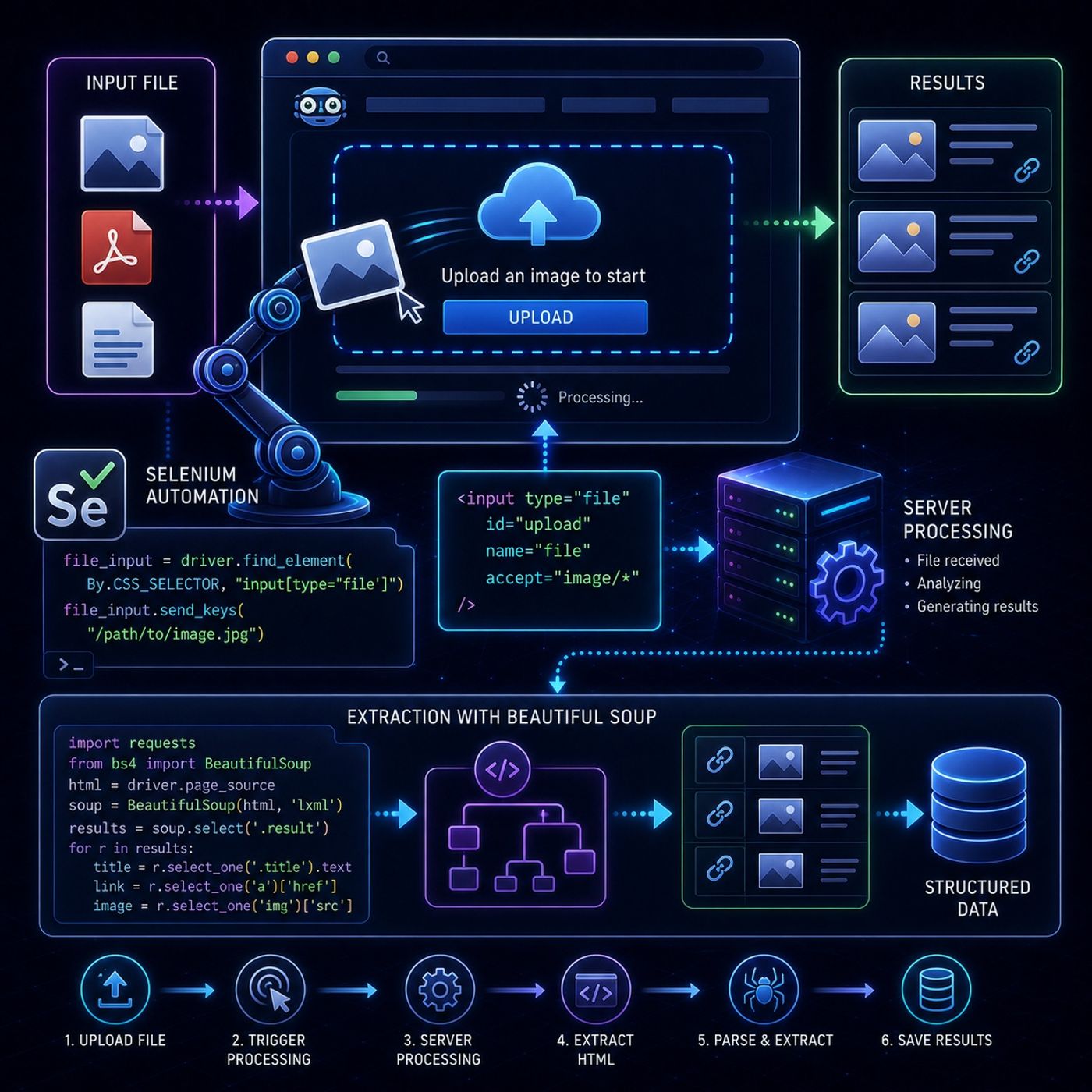
Course 40 - Web Scraping with Python | Episode 43: Mastering File Uploads and Reverse Image Search
Published 2 months, 1 week ago
Description
This episode is about a very specific but powerful capability in scraping:automating file uploads as part of a web interaction workflowIt sits at the intersection of browser automation + data extraction pipelines.📤 Core IdeaSome websites don’t just serve data — they require you to:
- upload a file
- trigger processing
- then return results
- upload input file (image, document, dataset)
- site processes it
- returns generated report or results
- image analysis tools
- document converters
- scientific portals
- upload required asset to continue navigation:
- resume
- profile image
- verification file
- file upload interacts with OS file picker
- JavaScript handles upload triggers
- UI must be “physically simulated”
- must be a valid local path
- file picker window is NOT used
- Selenium cannot control OS dialogs
- element with type="file"
- parse returned HTML
- extract:
- matching sites
- image sources
- metadata
- upload file
- click buttons
- trigger server processing
- file analyzed
- results generated dynamically
- parse final HTML
- extract structured results
- reverse image search engines
- AI document analyzers
- resume screening systems
- file validation services
- feeding inputs into systems
- triggering computation
- harvesting outputs
- Selenium handles interaction
- file path injection replaces manual upload dialogs
- Beautiful Soup handles result extraction