Episode Details
Back to Episodes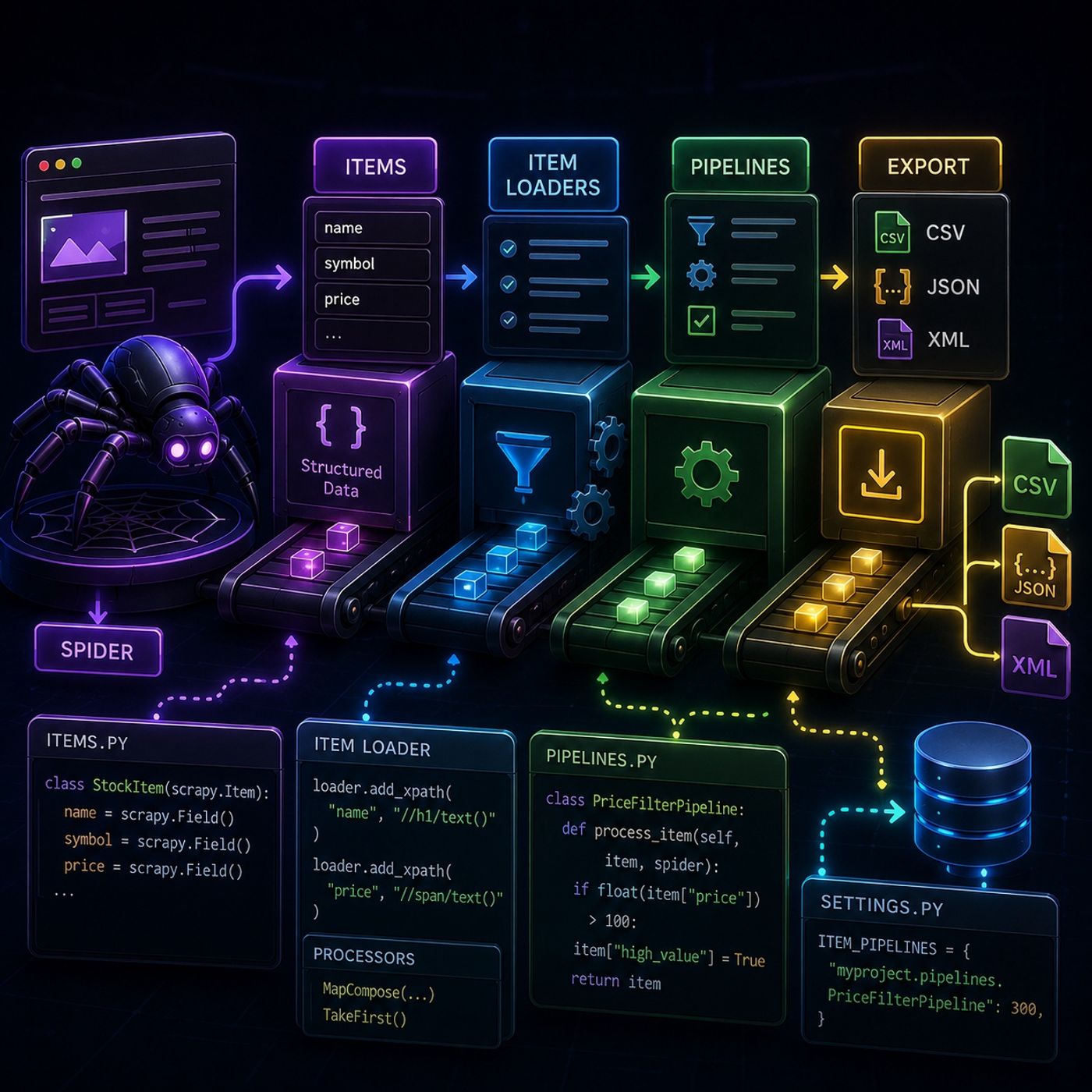
Course 40 - Web Scraping with Python | Episode 15: Mastering Items, Loaders, and Processing Pipelines
Published 3 months ago
Description
In this lesson, you’ll learn about: how Scrapy structures scraped data using Items, how Item Loaders simplify extraction and cleaning, and how Pipelines transform raw scraped output into usable datasets1. Scrapy Items (Structured Data Containers)🔹 What Are Items?Scrapy Items are structured containers for scraped data.Think of them as:a strongly-typed dictionary for scraped content🔹 Example Structureclass StockItem(scrapy.Item): name = scrapy.Field() symbol = scrapy.Field() price = scrapy.Field() 👉 Key Insight
Items force structure into messy web data2. Using Items in Scrapy Shell🔹 Manual Assignment FlowYou can:
Scrapy Shell helps you validate structure before automation3. Project-Based Item Integration🔹 Moving into Real SpidersItems are defined in:items.py Then used inside spiders:yield StockItem( name=name, symbol=symbol, price=price ) 👉 Key Insight
Items enforce consistency across your whole scraping system4. Exporting Data (CSV / JSON)🔹 Built-in Export Systemscrapy crawl stocks -o data.csv 🔹 Output Formats
Scrapy can export structured data without extra libraries5. Item Loaders (Automation Layer)🔹 Why They ExistItem Loaders reduce repetitive code and handle transformation automatically.🔹 Example Usageloader.add_xpath("price", "//span/text()") 6. Input & Output Processors🔹 MapCompose (Input Cleaning)from scrapy.loader.processors import MapCompose Used to:
Processors turn raw extraction into clean structured data automatically7. Pipelines (Post-Processing System)🔹 What Happens After ScrapingPipelines run after data extraction🔹 Example Pipelineclass PriceFilterPipeline: def process_item(self, item, spider): if float(item["price"]) > 100: item["high_value"] = True return item 👉 Key Insight
Pipelines are where business logic lives8. Enabling PipelinesIn settings.py:ITEM_PIPELINES = { "myproject.pipelines.PriceFilterPipeline": 300, } Lower number = higher priority9. Full Data Flow Model
👉 and start engineering data systems
You can listen and download our episodes for free on more than 10 different platforms:
https://linktr.ee/cybercode_academy
Items force structure into messy web data2. Using Items in Scrapy Shell🔹 Manual Assignment FlowYou can:
- Test XPath selectors
- Extract values manually
- Assign them into Items
Scrapy Shell helps you validate structure before automation3. Project-Based Item Integration🔹 Moving into Real SpidersItems are defined in:items.py Then used inside spiders:yield StockItem( name=name, symbol=symbol, price=price ) 👉 Key Insight
Items enforce consistency across your whole scraping system4. Exporting Data (CSV / JSON)🔹 Built-in Export Systemscrapy crawl stocks -o data.csv 🔹 Output Formats
- CSV → analytics
- JSON → APIs
- XML → legacy systems
Scrapy can export structured data without extra libraries5. Item Loaders (Automation Layer)🔹 Why They ExistItem Loaders reduce repetitive code and handle transformation automatically.🔹 Example Usageloader.add_xpath("price", "//span/text()") 6. Input & Output Processors🔹 MapCompose (Input Cleaning)from scrapy.loader.processors import MapCompose Used to:
- Clean URLs
- Format strings
- Convert data types
- Convert lists → single values
Processors turn raw extraction into clean structured data automatically7. Pipelines (Post-Processing System)🔹 What Happens After ScrapingPipelines run after data extraction🔹 Example Pipelineclass PriceFilterPipeline: def process_item(self, item, spider): if float(item["price"]) > 100: item["high_value"] = True return item 👉 Key Insight
Pipelines are where business logic lives8. Enabling PipelinesIn settings.py:ITEM_PIPELINES = { "myproject.pipelines.PriceFilterPipeline": 300, } Lower number = higher priority9. Full Data Flow Model
- Spider extracts data
- Items structure it
- Item Loaders clean it
- Pipelines transform it
- Export stores it
- 🕷️ Spider → collector
- 📦 Items → containers
- 🧼 Loaders → cleaning station
- 🏭 Pipelines → production line
👉 and start engineering data systems
You can listen and download our episodes for free on more than 10 different platforms:
https://linktr.ee/cybercode_academy