Episode Details
Back to Episodes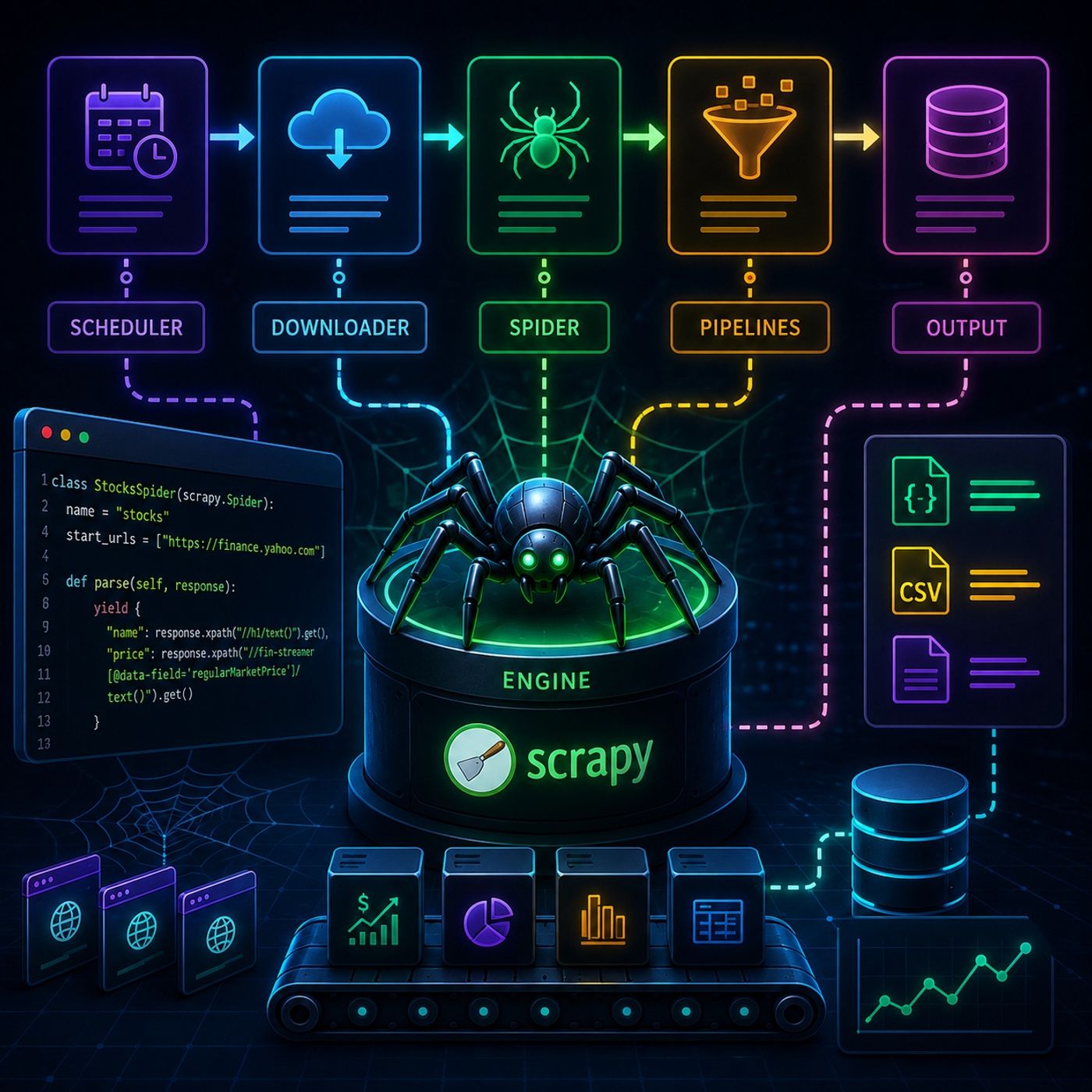
Course 40 - Web Scraping with Python | Episode 14: Building and Automating Custom Spiders with the Scrapy Framework
Published 3 months, 1 week ago
Description
In this lesson, you’ll learn about: Scrapy’s full architecture, how to build real spiders from scratch, and how to move from simple extraction to production-ready crawling with structured data pipelines1. Scrapy Architecture (How Everything Works)🔹 Core System FlowScrapy is built around a central engine that coordinates everything.🔹 Main ComponentsComponentRoleEngineControls flowSchedulerQueues URLsDownloaderFetches pagesSpiderExtracts dataPipelineProcesses & stores data👉 Key Insight
You don’t control HTTP manually—Scrapy does it for you2. Project Setup & Spider Creation🔹 Initialize a Projectscrapy startproject myproject 🔹 Generate a Spiderscrapy genspider stocks yahoo.com 🔹 Project Structuremyproject/ ├── spiders/ ├── items.py ├── pipelines.py ├── settings.py 👉 Key Insight
Each file has a strict responsibility → clean separation of logic3. Extracting Real Data (Yahoo Finance Example)🔹 Target Use CaseWe extract:
Spiders are just Python classes with extraction rules4. Running the Spider🔹 Execution Commandscrapy crawl stocks 🔹 Output Options
Scrapy supports structured output without extra code5. Item Loaders (Cleaner Code)🔹 Why They MatterItem Loaders help:
You separate extraction from transformation6. Pipelines (Final Processing Layer)🔹 What Pipelines Do
Pipelines act like a data factory assembly line7. Full Data Flow
You can listen and download our episodes for free on more than 10 different platforms:
https://linktr.ee/cybercode_academy
You don’t control HTTP manually—Scrapy does it for you2. Project Setup & Spider Creation🔹 Initialize a Projectscrapy startproject myproject 🔹 Generate a Spiderscrapy genspider stocks yahoo.com 🔹 Project Structuremyproject/ ├── spiders/ ├── items.py ├── pipelines.py ├── settings.py 👉 Key Insight
Each file has a strict responsibility → clean separation of logic3. Extracting Real Data (Yahoo Finance Example)🔹 Target Use CaseWe extract:
- Company name
- Stock price
- Market data
Spiders are just Python classes with extraction rules4. Running the Spider🔹 Execution Commandscrapy crawl stocks 🔹 Output Options
- Console print
- JSON export
- CSV export
- File writing
Scrapy supports structured output without extra code5. Item Loaders (Cleaner Code)🔹 Why They MatterItem Loaders help:
- Clean data
- Normalize values
- Reduce repeated logic
You separate extraction from transformation6. Pipelines (Final Processing Layer)🔹 What Pipelines Do
- Clean data
- Validate data
- Save to database/files
Pipelines act like a data factory assembly line7. Full Data Flow
- Scheduler queues URL
- Downloader fetches page
- Spider extracts data
- Pipeline cleans it
- Output stored
- 🧠 Brain → Engine
- 📦 Factory line → Pipelines
- 🕷️ Workers → Spiders
- 🚚 Delivery system → Downloader
- Spiders (logic)
- Selectors (extraction)
- Pipelines (processing)
You can listen and download our episodes for free on more than 10 different platforms:
https://linktr.ee/cybercode_academy